flutter theme 플러터 테마로 아이콘 색 변경, 앱바 색 바꾸기
2022. 7. 10. 11:52ㆍFlutter 플러터/플러터 공부기록
1. 플러터 theme 설명
상위 위젯에서 테마를 통해 설정해둔 색이 있더라도, 하위 위젯에서 해당 아이템에 직접적으로 색을 준다면 그 색을 우선으로 보여준다.
2. 플러터 color theme 예제
1) 전체 app bar 색 : 노란색
void main() {
  //stl 상위로 material 있어야 좋음
  runApp( MaterialApp(
      theme: ThemeData(
        appBarTheme: const AppBarTheme(color:Colors.yellow),
      ),
      home:const MyApp()));
}
2) 전체 아이콘 색 : 라임색
void main() {
  //stl 상위로 material 있어야 좋음
  runApp( MaterialApp(
      theme: ThemeData(
        appBarTheme: const AppBarTheme(color:Colors.yellow),
        iconTheme: const IconThemeData(color:Colors.lime)
      ),
      home:const MyApp()));
}
따라서, 이 경우 에뮬레이터를 돌려보면 노란 app bar와 라임색 아이콘이 나타나야한다.

3. app bar의 아이콘 색은 테마 색을 따르지 않게끔 개별로 설정하기
class MyApp extends StatelessWidget {
  const MyApp({Key? key}) : super(key: key);

  @override
  Widget build(BuildContext context) {
    return Scaffold(
      appBar: AppBar(actions: const[Icon(Icons.icecream, color : Colors.green)]),
      body: const Icon(Icons.icecream),
    );
  }
 }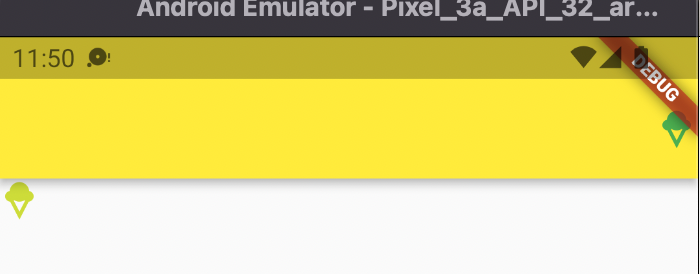
실제로, 테마 설정때문에 다른 모든 아이콘들을 바디에서 호출할 때 마다 라임색으로 뜨겠지만 직접 설정해준 초록색 아이스크림 아이콘은테마의 라임색을 따르지 않는다.
'Flutter 플러터 > 플러터 공부기록' 카테고리의 다른 글
| 플러터 버튼으로 사진 넘기는 갤러리 만들기 (0) | 2022.05.02 |
|---|---|
| 플러터 flutter listview.builder로 한번에 목록 구현 (0) | 2022.04.28 |
| 플러터 Flutter 키보드 구현하고 입력된 값 팝업으로 띄우기 (0) | 2022.04.26 |
| 플러터 Flutter Stateful widget 예제 (코드 설명 포함) (0) | 2022.04.26 |
| [플러터구현2] 플러터로 프로필 만들기 Drawer, UserAccountsDrawerHeader, ListTile 활용 (코드 설명 포함) (0) | 2022.04.21 |