플러터 Flutter Stateful widget 예제 (코드 설명 포함)
2022. 4. 26. 20:23ㆍFlutter 플러터/플러터 공부기록
1. 플러터 좋아요 개수 업데이트
import 'package:flutter/material.dart';

void main() {
  runApp(const MyApp());
}

class MyApp extends StatelessWidget {
  const MyApp({Key? key}) : super(key: key);

  // This widget is the root of your application.
  @override
  Widget build(BuildContext context) {
    return MaterialApp(
      title: 'Flutter Demo',
      theme: ThemeData(
        primarySwatch: Colors.blue,
      ),
      home: const MyHomePage(),
    );
  }
}

class MyHomePage extends StatefulWidget {
  const MyHomePage({Key? key}) : super(key: key);

  @override
  State<MyHomePage> createState() => _MyHomePageState();
}

class _MyHomePageState extends State<MyHomePage> {
  //변수
  late int count;
  //초기화
  @override
  void initState() {
    super.initState();
    count = 0;
  }

  @override
  Widget build(BuildContext context) {
    return Scaffold(
      appBar: AppBar(
        title: const Text('Counting application'),
        backgroundColor: Colors.amber,
      ),
      body: Center(
        child: Column(
          mainAxisAlignment: MainAxisAlignment.center,
          children: [
            //간격
            const SizedBox(
              height: 20,
            ),

            Text('받은 좋아요 개수 :  $count '),
          ],
        ),
      ),

      //진짜 floating action button
      floatingActionButton: FloatingActionButton(
        onPressed: () {
          setState(() {
            count++;
            const Icon(Icons.favorite_outlined);
          });
        },
        child: const Icon(Icons.favorite_border),
        backgroundColor: Colors.red[200],
      ),
    );
  }
}
2. 좋아요, 싫어요 수 업데이트

import 'package:flutter/material.dart';

void main() {
  runApp(const MyApp());
}

class MyApp extends StatelessWidget {
  const MyApp({Key? key}) : super(key: key);

  // This widget is the root of your application.
  @override
  Widget build(BuildContext context) {
    return MaterialApp(
      title: 'Flutter Demo',
      theme: ThemeData(
        primarySwatch: Colors.blue,
      ),
      home: const Statefulcounting(),
    );
  }
}

class Statefulcounting extends StatefulWidget {
  const Statefulcounting({Key? key}) : super(key: key);

  @override
  State<Statefulcounting> createState() => _StatefulcountingState();
}

class _StatefulcountingState extends State<Statefulcounting> {
  // 초기화는 나중에 할게 : late
  //1. 변수설정
  late int like;
  late int hate;

  //2. 초기화. void 다음엔 개발자맘대로, super.initState는 내장함수
  @override
  void initState() {
    super.initState();
    like = 0;
    hate = 0;
  }

  @override
  Widget build(BuildContext context) {
    return Scaffold(
      appBar: AppBar(
        title: const Text('Count Up & Down'),
        centerTitle: true,
      ),
      body: Center(
          child: Column(
        mainAxisAlignment: MainAxisAlignment.center,
        children: [
          Text('좋아요 수는 $like 입니다.'),
          Text('싫어요 수는 $hate 입니다.'),
          const SizedBox(
            height: 50,
          ),
          Row(
            mainAxisAlignment: MainAxisAlignment.center,
            children: [
              FloatingActionButton(
                backgroundColor: Colors.blue,
                onPressed: () {
                  setState(() {
                    like++;
                  });
                },
                child: const Icon(Icons.thumb_up),
              ),
              const SizedBox(
                width: 20,
              ),
              FloatingActionButton(
                backgroundColor: Colors.red,
                onPressed: () {
                  setState(() {
                    hate++;
                  });
                },
                child: const Icon(Icons.thumb_down),
              ),
            ],
          ),
        ],
      )),
    );
  }
}
3. 클릭수 더하고 빼기
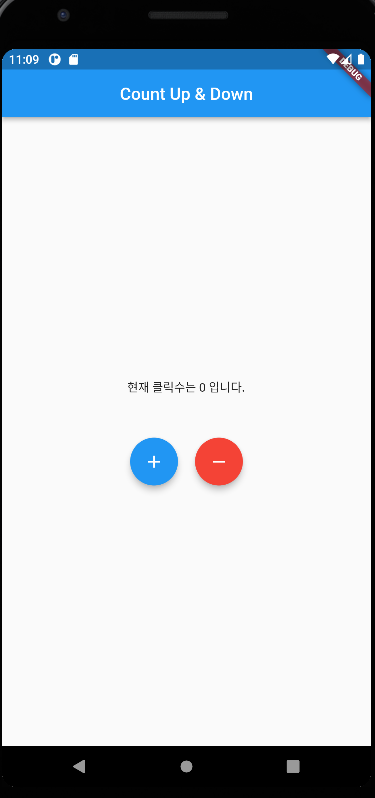
소스코드
import 'package:flutter/material.dart';

void main() {
  runApp(const MyApp());
}

class MyApp extends StatelessWidget {
  const MyApp({Key? key}) : super(key: key);

  // This widget is the root of your application.
  @override
  Widget build(BuildContext context) {
    return MaterialApp(
      title: 'Flutter Demo',
      theme: ThemeData(
        primarySwatch: Colors.blue,
      ),
      home: const Statefulcounting(),
    );
  }
}

class Statefulcounting extends StatefulWidget {
  const Statefulcounting({Key? key}) : super(key: key);

  @override
  State<Statefulcounting> createState() => _StatefulcountingState();
}

class _StatefulcountingState extends State<Statefulcounting> {
  // 초기화는 나중에 할게 : late
  //1. 변수설정
  late int count;

  //2. 초기화. void 다음엔 개발자맘대로, super.initState는 내장함수
  @override
  void initState() {
    super.initState();
    count = 0;
  }

  @override
  Widget build(BuildContext context) {
    return Scaffold(
      appBar: AppBar(
        title: const Text('Count Up & Down'),
        centerTitle: true,
      ),
      body: Center(
          child: Column(
        mainAxisAlignment: MainAxisAlignment.center,
        children: [
          Text('현재 클릭수는 $count 입니다.'),
          const SizedBox(
            height: 50,
          ),
          Row(
            mainAxisAlignment: MainAxisAlignment.center,
            children: [
              FloatingActionButton(
                backgroundColor: Colors.blue,
                onPressed: () {
                  setState(() {
                    count++;
                  });
                },
                child: const Icon(Icons.add),
              ),
              const SizedBox(
                width: 20,
              ),
              FloatingActionButton(
                backgroundColor: Colors.red,
                onPressed: () {
                  setState(() {
                    count--;
                  });
                },
                child: const Icon(Icons.remove),
              ),
            ],
          ),
        ],
      )),
    );
  }
}
'Flutter 플러터 > 플러터 공부기록' 카테고리의 다른 글
| 플러터 flutter listview.builder로 한번에 목록 구현 (0) | 2022.04.28 |
|---|---|
| 플러터 Flutter 키보드 구현하고 입력된 값 팝업으로 띄우기 (0) | 2022.04.26 |
| [플러터구현2] 플러터로 프로필 만들기 Drawer, UserAccountsDrawerHeader, ListTile 활용 (코드 설명 포함) (0) | 2022.04.21 |
| Flutter 플러터 환경변수 설정방법 (윈도우, Windows) (0) | 2022.04.18 |
| 플러터 flutter 프로젝트 생성하고 위젯으로 글씨, 이미지 삽입, 그림 넣기, 박스 만들기 (0) | 2022.04.13 |