2022. 5. 11. 18:21ㆍ카테고리 없음
> before start
- on Mac, we can run our own app with 'ctrl + shift + r'
- Kotlin provides 'type inference', which let us to code without using specific data type.
- We can not define variables using ' _ '
1. how to make function
using function functionname () {}
package com.example.udemy2_kotlin

fun main(){

}
2. difference between val and var
val : can not be reassigned, no changes are allowed.
var : can be reassigned, user is able to change the data inside 'var'
package com.example.udemy2_kotlin

fun main(){
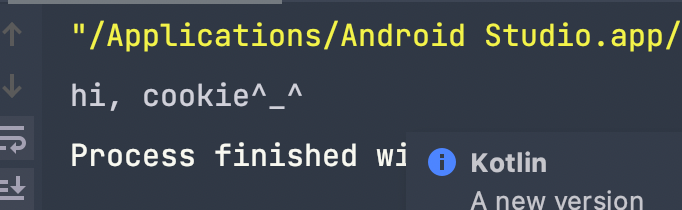
    var name = "slowbook"
    name = "cookie"
    print("hi, "+name + "^_^")
}
3. Data type
If we use 'var (variable name) = (data)', kotlin assigns the data to the variable with appropriate type automatically.
However, we can also designate each variables' types. In this case, we can not assign the data that is not included in the range of already-defined data type.
1) Number
val (user-defined name of variable) : (DataType) = (Data, number)
(1) integer
Byte, Short, Int, Long
package com.example.udemy2_kotlin

fun main(){

    val thisisMyOwnIntegerNumber : Int = 98765432
    print(thisisMyOwnIntegerNumber)

}
If we put 9876543298765432 into the variable, the error comes because of the range of Int type.
(2) floating
Float + F
If we want to use floating number with the type of Float, we should add 'F' at the end of the number.
Double
Otherwise, double type doesn't need extra ' F '.
package com.example.udemy2_kotlin

fun main(){

    val thisisMyOwnIntegerNumber : Int = 98765432
    print(thisisMyOwnIntegerNumber)
    val thisisMyOwnFloatingNumber : Float = 9876.5432F
    print(thisisMyOwnFloatingNumber)

}
2) Boolean
package com.example.udemy2_kotlin

fun main(){
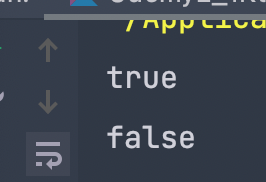
    var trueOrFalse : Boolean = true
    print(trueOrFalse)
    print("\n")
    trueOrFalse = false
    print(trueOrFalse)
    print("\n")


}
result
3) String, character
(1) character
we can assign one alphabet, one special signs.
fun main(){
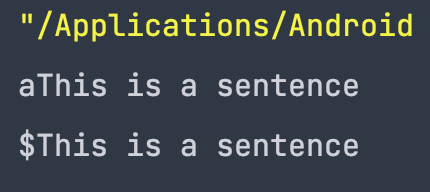
    val specialCharacter = '$'
    val specialAlphabet : Char = 'a'
    val sentences = "This is a sentence\n"
    print(specialAlphabet + sentences)
    print(specialCharacter + sentences)
}
result
2) String
we can use string as a group of characters, calling each with List [position]
ex)
[0] [1]
h i
Final practice of using variables with specific data types!

package com.example.udemy2_kotlin

fun main(){
    val floatingFloat : Float = 13.37F
    val floatingDouble : Double = 3.14159265358979
    var title : String = "Android Masterclass"
    var integerByte :Byte= 25
    var integerInt : Int = 2020
    var integerLong : Long= 18881234567
    var isItTrue : Boolean = true
    var oneCharacter : Char = 'a'

    print(floatingFloat)
    print('\n')
    print(floatingDouble)
    print('\n')
    print(title)
    print('\n')
    print(integerByte)
    print('\n')
    print(integerInt)
    print('\n')
    print(integerLong)
    print('\n')
    print(isItTrue)
    print('\n')
    print(oneCharacter)
}