flutter bottom navigation bar
2022. 7. 21. 17:19ㆍFlutter 플러터/플러터 기능별 정리
1. result
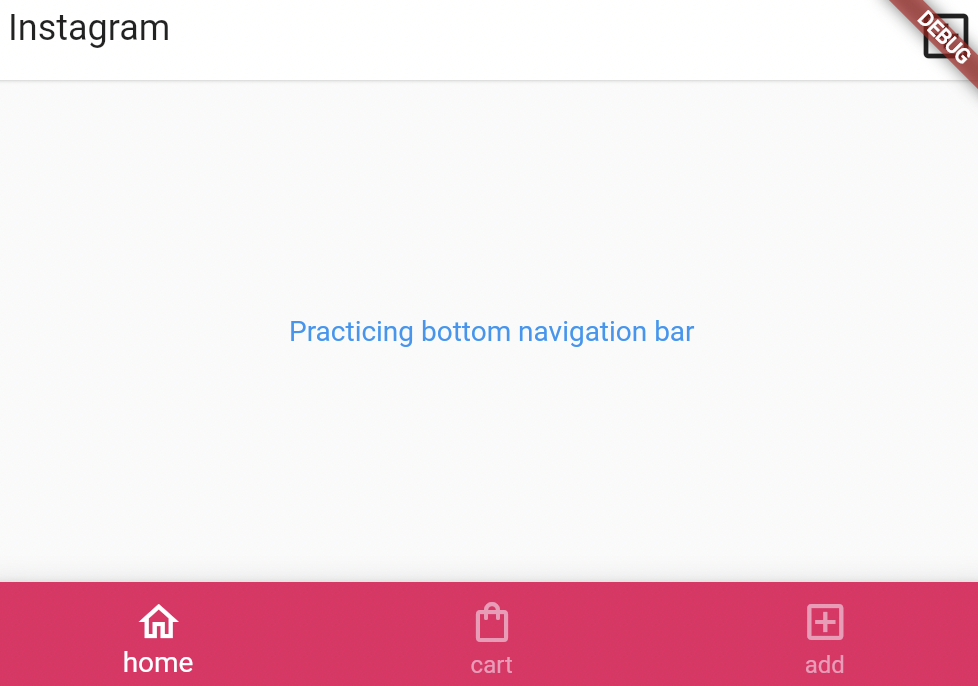
2. how to make?
1) code
      bottomNavigationBar: BottomNavigationBar(
        type:BottomNavigationBarType.fixed,
        backgroundColor: Colors.pink,
        selectedItemColor: Colors.white,
        unselectedItemColor: Colors.white54,
        items:const [
          BottomNavigationBarItem(
            icon:Icon(Icons.home_outlined),
            label : 'home'
          ),
          BottomNavigationBarItem(
            icon:Icon(Icons.shopping_bag_outlined),
            label : 'cart'
          ),
          BottomNavigationBarItem(
              icon:Icon(Icons.add_box_outlined),
              label : 'add'
          ),
        ]

      ),
2) explanation
(1) bottomnavigationbar
bottomNavigationBar: BottomNavigationBar(
  type:BottomNavigationBarType.fixed,
  backgroundColor: Colors.pink,
  selectedItemColor: Colors.white,
  unselectedItemColor: Colors.white54,
  items:const [
    BottomNavigationBarItem(
scaffold has body, appBaar, bottomNavigationBar
We can use bottomNavigationBar to call BottomNavigationBar ().
inside of BottomNavigationBar(), we can define the type of bar, colors of bar and each items of bar.
Items can be considered as a list by <items : [ ]>
BottomNavigationBarItem(
  icon:Icon(Icons.home_outlined),
  label : 'home'
),
< items : [ ] > can have BottomNavigationBarItem suchas icons and labels.
Becareful that if the label is null, the program may not run appropriately.
BottomNavigationBarItem(
  icon:Icon(Icons.home_outlined),
  label : 'home'
),
BottomNavigationBarItem(
  icon:Icon(Icons.shopping_bag_outlined),
  label : 'cart'
),
BottomNavigationBarItem(
    icon:Icon(Icons.add_box_outlined),
    label : 'add'
),
items of the bar follows the order of the order of Flutter code.
'Flutter 플러터 > 플러터 기능별 정리' 카테고리의 다른 글
| flutter appbar 플러터 앱바 너비 높이 글자 스타일 조정 leading text (0) | 2022.07.10 |
|---|---|
| 플러터 flutter 박스 효과 (박스 색, 크기, 테두리, 정렬, 여백) 완전정복 (코드 예시 설명 포함) (0) | 2022.04.24 |
| 플러터 앱바, 버튼 색칠하기 flutter button color (BackgroundColor, StyleFrom, ButtonStyle) (0) | 2022.04.20 |